By Rahul Suresh
I’m a self-taught builder from Delhi. No CS degree. No bootcamp. Just a 12-year-old laptop, curiosity, and an internet connection that cuts out when it rains.
For this post — I did something I had been putting off for weeks. I built and launched my own blog. Not on Medium. Not on Substack. Not on Notion pages. My own domain, my own hosting, my own everything. And I paid exactly ₹0 for it.
This is the honest story of how it happened. Every error, every confusion, every “what the hell does that mean” moment — all of it. Because if you’re like me, you don’t need another polished tutorial written by someone who forgot what it feels like to be a beginner.
You need someone who just did it an hour ago.
Step 1 — Picking the Right Tools
The first decision was — where do I actually host this thing?
I looked at the options. GitHub Pages — free, but limited. Netlify — free tier, decent. Cloudflare Pages — free, fast, and runs on one of the best global networks on the planet. Cloudflare won.
For the blog itself, I went with Jekyll — a static site generator that turns plain Markdown files into a full website. No database. No WordPress. No monthly fees. Just files.
The theme I picked was Lagrange — clean, minimal, readable. Exactly what a developer notebook should look like. No clutter, no animations fighting for your attention. Just words on a screen.
The full stack ended up being:
- Jekyll — turns Markdown into HTML
- GitHub — stores all my code
- Cloudflare Pages — hosts and deploys the site automatically
- Cost — ₹0
The whole idea was simple. I write a post in Markdown on my laptop, push it to GitHub, and Cloudflare automatically builds and deploys it live within 2 minutes. No clicking “publish”. No logging into a dashboard. Just git push and it’s live.
Sounds simple. It was not.
Step 2 — The Research Phase (aka Talking to Every AI I Could Find)
Before I wrote a single line of code, I did what any self-taught builder does — I asked every AI I could find.
I started with Gemini. I asked it the most beginner question possible: “What is GitHub Pages and can I make a complete website with it?”
Gemini gave me a solid breakdown. GitHub Pages — free, integrated with GitHub, Jekyll support built in. Sounded perfect. But then I dug deeper and found the problem — 1 GB repository limit. I’m planning to write daily for years. Research papers. AI breakdowns. Code experiments. Images. That 1 GB would fill up fast.
So I asked the follow-up question that changed everything: “I want no 1 GB limit, fastest servers, open source code on GitHub, green dots on my activity chart, and a free domain for life. Do I have any option?”
The answer was Cloudflare Pages.
Unlimited bandwidth. Global CDN with data centers across the entire planet. Auto-deploys every time you push to GitHub. And your code stays fully open on GitHub — so every blog post = a green square on your contribution chart.
This wasn’t just a blog anymore either. I wanted a platform that could hold everything — bold text, images, code blocks with syntax highlighting, embedded YouTube videos, interactive charts, research papers, tables, footnotes, Disqus comments, related posts. The works.
Jekyll with the right theme could handle all of it. And it would cost me nothing.
The final stack was decided:
- Jekyll — content engine
- Lagrange theme — clean design
- GitHub — open source storage + green dots
- Cloudflare Pages — free hosting, unlimited bandwidth
- rahul-builds.pages.dev — free domain, forever
(Yes the domain is free too — Cloudflare gives every Pages project a .pages.dev subdomain at no cost. Maybe it’s my luck 😁)
Now I just had to actually build it.
Step 3 — Actually Building It (Nothing Worked The First Time)
I had my stack decided. I had my theme picked. Now I just needed to set it up.
I cloned the Lagrange Jekyll theme, configured the _config.yml file — blog name, description, social links, all of it. Created my first post. Day 0 — Why I Started Rahul Builds. Wrote it in Markdown. Felt good. Felt ready.
Then came Git.
First mistake — I tried to push without initializing Git in the folder.
fatal: not a git repository (or any of the parent directories): .git
Right. git init first. Simple fix.
Second mistake — I committed everything and tried to push to main.
error: src refspec main does not match any
Turns out my local branch was called master not main. Git defaulted to the old naming convention. Nobody tells you this. Spent 10 minutes confused before figuring out the fix — just push to master instead.
git push -u origin master
53 files pushed. First win of the night.
Then came Cloudflare.
Setting up Cloudflare Pages looked simple. Connect GitHub repo, pick framework, deploy. Except Cloudflare recently merged their Workers and Pages UI into one dashboard — and the Pages option is now hidden behind a tiny link at the bottom of the screen that says “Looking to deploy Pages? Get started.”
Spent another 15 minutes clicking the wrong things before finding it.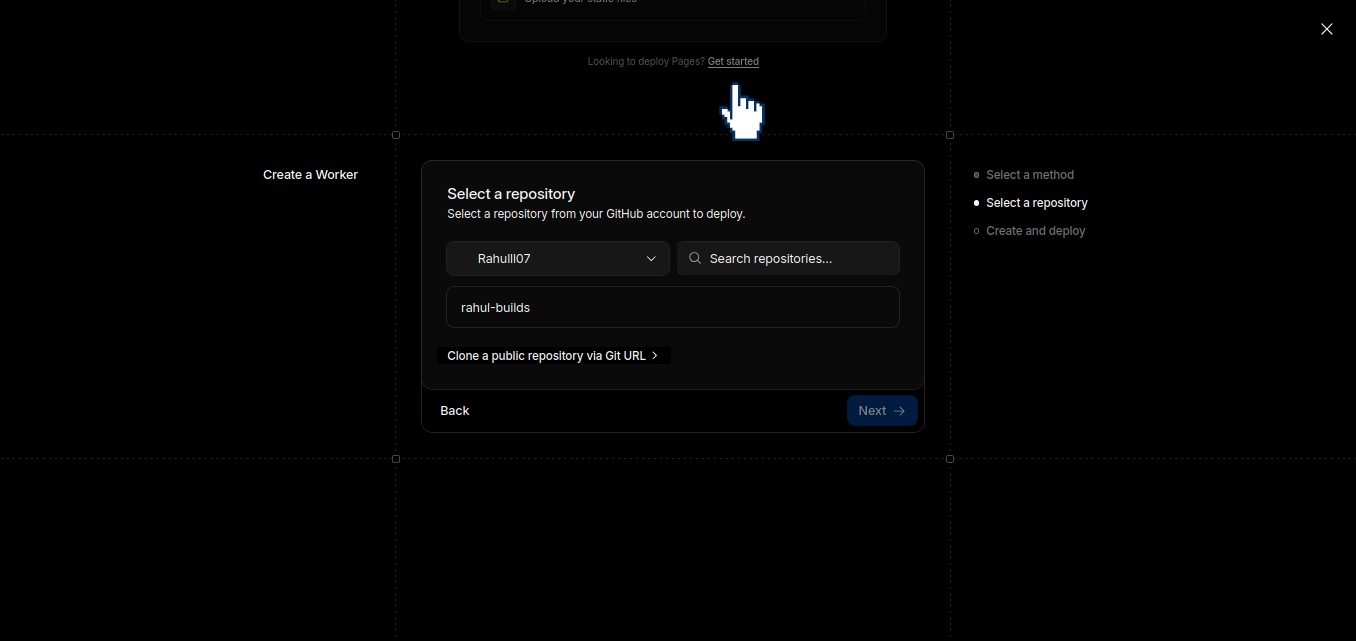
Finally got to the build settings. Selected Jekyll. Set build command to jekyll build. Hit deploy.
Build failed.
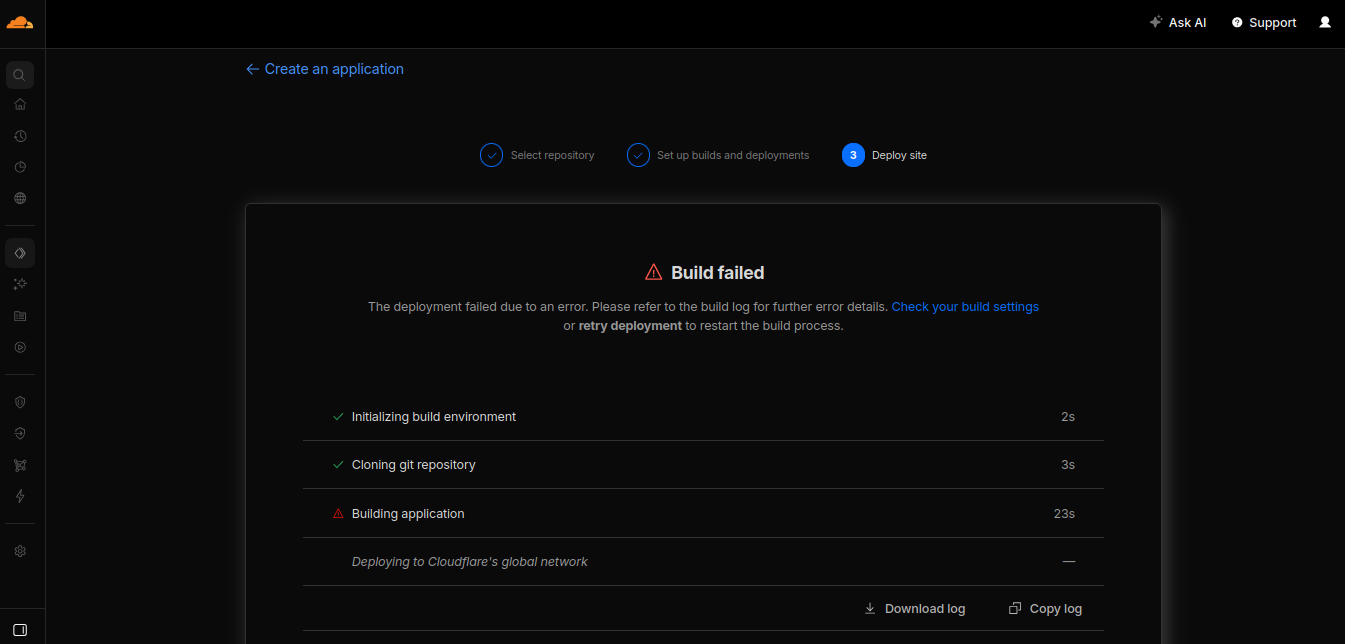
You have already activated google-protobuf 4.31.1,
but your Gemfile requires google-protobuf 3.25.8.
Prepending bundle exec to your command may solve this.
Changed build command to bundle exec jekyll build. Hit deploy again.
Build failed again.
cannot load such file -- bigdecimal (LoadError)
Ruby 3.4 — the version Cloudflare uses — removed bigdecimal from its default gems. Nobody documents this anywhere obvious. The fix was adding one line to the Gemfile:
echo 'gem "bigdecimal"' >> Gemfile
bundle install
git add .
git commit -m "fix: add bigdecimal gem for Ruby 3.4 compatibility"
git push origin master
Cloudflare detected the push automatically. Started a new build.
This time — no errors.
✅ Bundle complete! 42 gems installed
✅ Executing user command: bundle exec jekyll build
✅ Deploy successful
I opened the browser and typed rahul-builds.pages.dev.
It loaded.
What I Built
Let me tell you exactly what is sitting at rahul-builds.pages.dev right now.
A fully functioning blog and research platform. Built from scratch (technically not from scratch — we used a Jekyll theme as the foundation, which is exactly what professionals do). Deployed on Cloudflare’s global network. Code completely open on GitHub. Auto-deploys every time I push. Free forever.
Here’s what this site can hold — not just simple blog posts:
- ✅ Research papers with proper headings, footnotes, and citations
- ✅ Code blocks with full syntax highlighting
- ✅ Images anywhere inside posts
- ✅ Embedded YouTube videos and X posts
- ✅ Interactive charts via JavaScript
- ✅ Tables, bullet lists, numbered lists
- ✅ Categories and tags
- ✅ Disqus comments section
- ✅ Related post suggestions
- ✅ SEO built in via jekyll-seo-tag
- ✅ RSS feed for subscribers via jekyll-feed
- ✅ Sitemap auto-generated
This is not a Medium post. This is not a Substack newsletter. This is my own corner of the internet — where I own everything, control everything, and pay nothing 😁.
What It Cost
| Item | Cost |
|---|---|
| Hosting | ₹0 — Cloudflare Pages |
| Domain | ₹0 — pages.dev subdomain |
| Theme | ₹0 — Lagrange open source |
| SSL Certificate | ₹0 — Cloudflare handles it |
| Bandwidth | ₹0 — unlimited on free plan |
| Total | ₹0 |
Why This Workflow Is Powerful
Every time I write something — an AI experiment, a tool breakdown, a research note, a build log — I run three commands:
git add .
git commit -m "what I built today"
git push origin master
Two minutes later it’s live. And my GitHub contribution chart gets a green square.
In one year of writing daily, that chart will be a solid wall of green. Not because I was grinding LeetCode. Not because I was memorising algorithms. But because I was building, researching, writing, and thinking in public.
That’s the whole point of Rahul Builds.
A self-taught builder from Delhi. No CS degree. No bootcamp. Just a 12-year-old laptop, a curiosity that doesn’t quit, and now — a live website on the internet that belongs entirely to me.
rahul-builds.pages.dev
Day 1 is live. Day 2 starts tomorrow.